lysosome for Mac · 14-day free trial
Your Mac filled up after you started building with AI.
You didn't download anything big. But since you started making things with Claude Code, Cursor or a local model, your disk keeps shrinking. lysosome for Mac shows you where the space went, tells you which parts are safe to remove, and cleans them up with one click. Anything it moves goes to the Trash, and Undo puts it back.
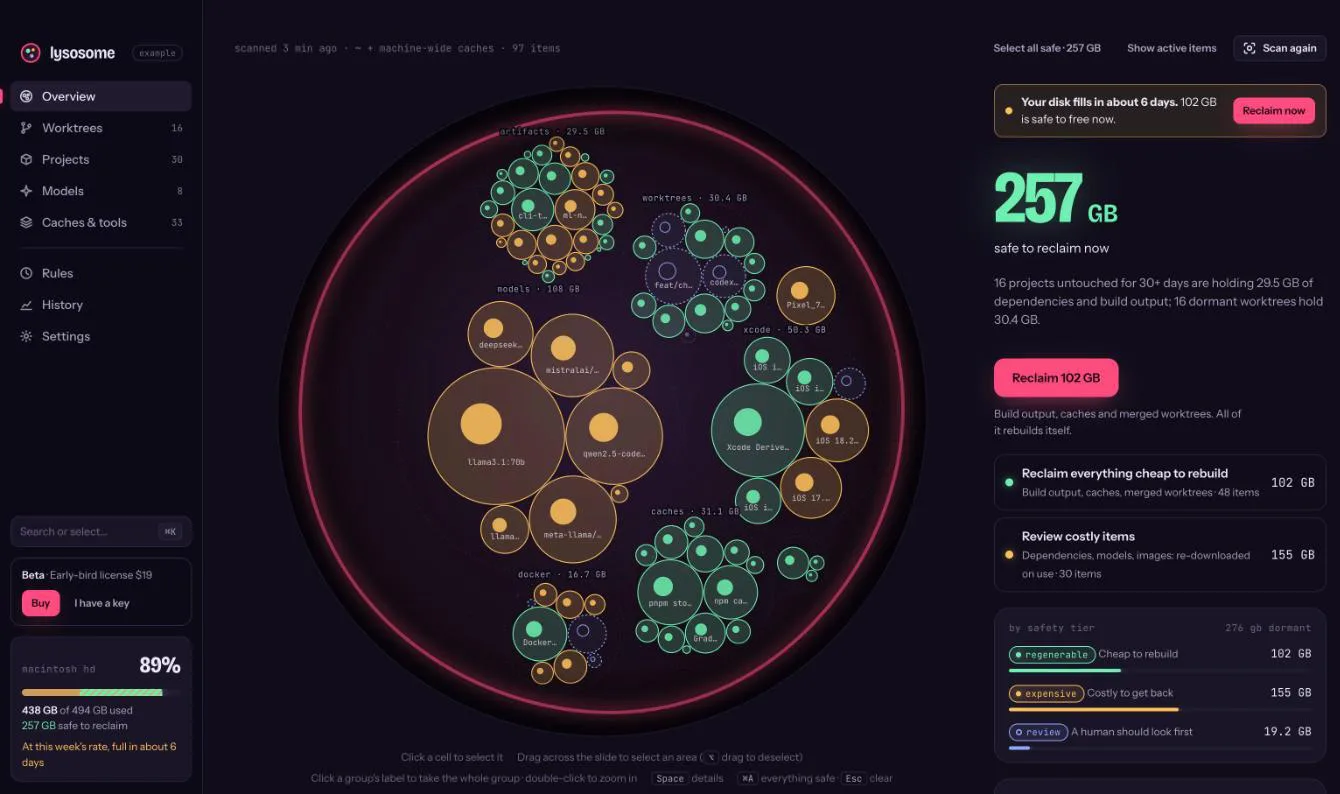
What's actually filling it
AI tools are fast because they make copies and download things in the background. Nobody tells you to clean up afterwards. The usual suspects:
- Agent copies of your project. Claude Code, Cursor and other agents often work in a separate copy of your project for each task (a "git worktree"). When the task ends, the copy usually stays.
node_modulesand other installed packages. Each copy of a project gets its own set of downloaded libraries, often hundreds of megabytes each. A project you pulled down from Lovable, Bolt or a template to run on your Mac brings one too.- Local AI models. A model you tried once in Ollama or LM Studio can take anywhere from a few GB to 40 GB, and it stays after you stop using it.
- Docker. If a setup guide had you install Docker, its storage keeps growing on its own.
- Xcode. Building an iPhone app leaves build files, simulators and device support files that add up to tens of gigabytes.
- Download caches. npm, pnpm, pip and other tools keep a copy of everything they've ever downloaded.
How much this adds up to depends on the Mac. On one Mac used heavily with Claude Code, 161 leftover project copies held 150 GB.
Why deleting it yourself is scary
These folders have names like .claude/worktrees/, DerivedData or _cacache. Some are safe to delete and come back on their own the next time you need them. Some hold work you haven't saved anywhere else. From Finder you can't tell which is which, so most people either leave it all or delete the wrong thing.
lysosome makes that call for you, and is careful about it:
- Every item gets a label. Safe to clear means it rebuilds itself. Costs a re-download means it's safe but you'll wait to get it back. Review means it might hold your work, and lysosome never removes those for you.
- It checks your work first. An agent's project copy only counts as removable if everything in it is saved and pushed. Anything with unsaved or unpushed changes is left alone.
- Trash, not delete. Files go to the Trash and Undo puts them back. Before you click, it shows exactly what will go and which parts can't be undone (for example a cache cleaned by its own tool).
- It knows which agent made what. Project copies are matched to the Claude Code or Cursor session that created them, so you can tell a finished task from one still running.
Then it keeps watch
- A small gauge in the menu bar shows how full your disk is, and warns you before it runs out mid-task.
- Optional cleanup rules, like "clear download caches older than 14 days, Sundays at 3am". Items labeled Review are never part of a rule.
What it costs
Every install starts with a 14-day free trial of everything. After it, seeing where your disk went (the scan, the menu bar gauge, alerts and Undo) stays free. One-click cleanup and scheduled rules need a one-time license: $19 until December 31, 2026, then $29, with a year of updates. No subscription.
Prefer the terminal? The same engine is a free, open-source command-line tool. Install the CLI.