Open-source CLI available now Mac app in free beta
Digest what your agents leave behind.
Claude Code, Cursor and parallel agents spin up git worktrees all day, and each one drags its own node_modules, target/ or .venv. lysosome finds them, along with stale build output, package caches, local AI models, Docker and Xcode data. It labels every item by how safe it is to remove, and never touches work you haven't pushed.
brew install lysosome-dev/tap/lysosome
CLI · available now · more ways to install
Example output
See where the space went before anything is deleted.
Four commands, all in the current release. worktrees, scan and caches only read; clean is a dry run until you add --yes, re-checks every item right before acting, moves files to the Trash and logs every action. REVIEW and ORPHAN items are never cleaned. Every command also speaks --json, a stable, versioned contract you can script against.
$ lysosome worktrees ~/code --top 6

  23 dormant worktrees are holding 41.2 GB  of 31 found · idle 30+ days

    18.6 GB  safe to remove now          14 clean, merged or pushed
    27.9 GB  build & dependency output   strippable even from worktrees you keep

  STATUS       SIZE  ARTIFACTS  IDLE  BRANCH                 PATH
  REMOVABLE  6.4 GB     5.8 GB   47d  feat/checkout-v2       ~/code/shop/.claude/worktrees/checkout-v2
  REMOVABLE  4.1 GB     3.6 GB   38d  agent/fix-flaky-tests  ~/code/api/.claude/worktrees/fix-flaky-tests
  REVIEW     3.9 GB     3.1 GB   61d  spike/rust-indexer     ~/code/indexer-spike
             └ 2 unpushed commits, not merged
  REMOVABLE  3.2 GB     2.9 GB   33d  refactor-auth          ~/.cursor/worktrees/web/refactor-auth
  ORPHAN     2.7 GB     2.4 GB   96d  –                      ~/code/old-monorepo-wt
             └ parent repo moved or deleted
  REVIEW     2.2 GB     1.7 GB   44d  feat/onboarding        ~/code/app-onboarding
             └ 14 uncommitted changes
  … 17 more (use --top N)

  2 stale worktree records point at deleted folders  harmless; `git worktree prune` clears them
    ~/code/shop  →  ~/code/shop/.claude/worktrees/old-cart
    ~/code/api  →  ~/code/api/.claude/worktrees/v1-cleanup

  Suggested cleanup for REMOVABLE worktrees  review, then run yourself
    git -C "/Users/you/code/shop" worktree remove "/Users/you/code/shop/.claude/worktrees/checkout-v2"
    git -C "/Users/you/code/api" worktree remove "/Users/you/code/api/.claude/worktrees/fix-flaky-tests"
    git -C "/Users/you/code/web" worktree remove "/Users/you/.cursor/worktrees/web/refactor-auth"
    … 11 more (see --json for every command)
    Removing a worktree keeps its branch; delete merged branches with `git branch -d`.

  Scanned 2,184 folders under ~/code in 3.8s. Nothing was changed.
$ lysosome scan ~/code --top 2

  47 projects untouched for 30+ days are holding 14.9 GB of dependencies and build output.

    88.6 GB  reclaimable now         REMOVABLE items in every section
    36.0 GB  regenerable             cheap to rebuild (build output, caches, merged worktrees)
    52.6 GB  regenerable_expensive   costly to get back (dependencies to re-download)
    24.0 GB  review                  a human should look first
    Tier totals cover every idle item; each byte is counted once.

  ── Git worktrees  41.2 GB idle in 23 items of 31

  23 dormant worktrees are holding 41.2 GB  of 31 found · idle 30+ days

    18.6 GB  safe to remove now          14 clean, merged or pushed
    27.9 GB  build & dependency output   strippable even from worktrees you keep

  STATUS       SIZE  ARTIFACTS  IDLE  BRANCH                 PATH
  REMOVABLE  6.4 GB     5.8 GB   47d  feat/checkout-v2       ~/code/shop/.claude/worktrees/checkout-v2
  REMOVABLE  4.1 GB     3.6 GB   38d  agent/fix-flaky-tests  ~/code/api/.claude/worktrees/fix-flaky-tests
  … 21 more (use --top N)

  Suggested cleanup for REMOVABLE worktrees  review, then run yourself
    …

  ── Project build & dependency output  14.9 GB idle in 112 items of 140

    STATUS     TIER      SIZE  IDLE  KIND          PATH
  ~/code/mobile-app  2.4 GB · idle 211d
    REMOVABLE  costly  1.6 GB  211d  node_modules  node_modules
    REMOVABLE  costly  812 MB  211d  Pods          ios/Pods
  ~/code/ml-sandbox  1.9 GB · idle 143d
    REMOVABLE  costly  1.9 GB  143d  .venv         .venv
  … 45 more (use --top N)

  ── AI models  38.4 GB idle in 5 items of 5

  STATUS     TIER       SIZE  IDLE  NAME               PATH
  REMOVABLE  costly  19.9 GB   52d  qwen2.5-coder:32b  ~/.ollama/models
  REMOVABLE  costly   9.0 GB   97d  deepseek-r1:14b    ~/.ollama/models
  … 3 more (use --top N)

  …

  Scanned 2,184 folders under ~/code in 6.2s. Nothing was changed.
$ lysosome caches --top 2

  Caches, models and tool data are holding 56.5 GB  in 41 items

    14.8 GB  cheap to rebuild      caches and build output, refilled on demand
    40.3 GB  costly to get back    models, images, simulators: re-download to use again
     1.4 GB  needs review          archives, volumes, shared data

  AI MODELS  38.4 GB
    TIER       SIZE  LAST USED  NAME               CLEANUP / LOCATION
    costly  19.9 GB    52d ago  qwen2.5-coder:32b  ollama rm qwen2.5-coder:32b
    costly   9.0 GB    3mo ago  deepseek-r1:14b    ollama rm deepseek-r1:14b
    … and 3 more (9.5 GB); use --top or --json

  XCODE  9.8 GB
    TIER      SIZE  LAST USED  NAME                         CLEANUP / LOCATION
    cache   4.6 GB      today  Xcode DerivedData            ~/Library/Developer/Xcode/DerivedData
    cache   3.1 GB    4mo ago  iOS iPhone15,2 18.5 (22F76)  ~/Library/Developer/Xcode/iOS DeviceSupport/iPhone15,2 18.5 (22F76)
    … and 2 more (2.1 GB); use --top or --json

  PACKAGE CACHES  6.1 GB
    TIER      SIZE  LAST USED  NAME        CLEANUP / LOCATION
    cache   2.4 GB      today  npm cache   npm cache clean --force
    cache   1.6 GB     3d ago  pnpm store  pnpm store prune
    … and 9 more (2.1 GB); use --top or --json

  CONTAINERS  2.2 GB
    TIER      SIZE  LAST USED  NAME                CLEANUP / LOCATION
    review  1.4 GB          –  pgdata              docker://volume/pgdata
           └ volume data used by 1 container(s); may hold databases or state
    cache   812 MB    2mo ago  Docker build cache  docker builder prune --force

  Ran 29 detectors in 2.9s. Nothing was changed.
$ lysosome clean ~/code --older-than 90d

  Dry run. Nothing will be changed.

  ── Git worktrees  3 items · 4.2 GB
    each: git -C <main repo> worktree remove <path> (no --force), then git worktree prune; branches are kept
    cheap   1.9 GB  remove worktree  ~/code/shop/.claude/worktrees/promo-banner
    cheap   1.4 GB  remove worktree  ~/.cursor/worktrees/web/legacy-nav
    cheap   904 MB  remove worktree  ~/code/api/.claude/worktrees/rate-limits

  ── Project build & dependency output  2 items · 1.7 GB
    cheap   1.2 GB  move to Trash    ~/code/old-cli/target
    cheap   486 MB  move to Trash    ~/code/blog/.next

  ── Xcode  1 item · 3.1 GB
    cheap   3.1 GB  move to Trash    ~/Library/Developer/Xcode/iOS DeviceSupport/iPhone15,2 18.5 (22F76)

  ── Package caches  2 items · 1.4 GB
    cheap   1.1 GB  run              yarn cache clean
    cheap   318 MB  run              bun pm cache rm

  Would reclaim 10.4 GB (8 items) · files go to the Trash
  Held back: 2.7 GB costly to get back (add --tier regenerable_expensive) · 9 REVIEW items (21.3 GB) need review and are never cleaned · 1 ORPHAN never cleaned · 38 items newer than --older-than or of unknown age

  Run again with --yes to do it.
Example output in the format of lysosome v0.2.0, with made-up paths and sizes and some sections shortened. Your numbers will differ.
What it finds
Six places a dev Mac quietly fills up.
Every finding carries a safety tier, so you know what a deletion costs before you make it.
-
Agent worktrees
.claude/worktrees/*~/.cursor/worktrees/*git worktree addIdle 30+ days, clean, and merged or pushed: removable. Dirty, locked or unpushed: left for you. Orphans and stale metadata get flagged too.
regenerablereview
-
Build artifacts
node_modulestarget/.venv.nextdistPodsOnly folders git confirms are ignored, ranked by how long the project has been untouched.
regenerable_expensive
-
Local AI models
~/.ollama/models~/.cache/huggingface~/.lmstudioListed by model name, size and last use, not blob hashes, with what it would cost to download again.
regenerable_expensive
-
Package caches
~/.npmpnpm store~/.cargo/registryGoGradleHomebrewResolved from each tool where it can tell us, so custom cache locations are found too.
regenerable
-
Docker & OrbStack
build cacheimagesvolumesBuild cache is cheap to lose; images cost a pull. Volumes may hold data, so they stay in review.
regenerableregenerable_expensivereview
-
Xcode
DerivedDataiOS DeviceSupportsimulatorsArchivesDerivedData rebuilds on the next build. Archives hold dSYMs you may need for crash reports.
regenerableregenerable_expensivereview
Safety
Careful by default, every time.
A lysosome breaks down only what the cell has marked as waste. Same idea here: nothing goes unless it's clearly rebuildable, and anything ambiguous waits for you.
- Scans are read-only
- Git runs with
--no-optional-locks. Nothing is written, not even the index. - Dry run first
cleanprints exactly what would happen. Nothing changes until you add--yes.- Unpushed work is off-limits
- Worktrees with uncommitted changes, untracked files, locks or unpushed commits are never removed.
- Recoverable
- Items go to the macOS Trash, or through the tool's own cleanup:
git worktree remove,docker image prune,brew cleanup,xcrun simctl. - Only ignored files count
- A folder is an artifact only if
git check-ignoreagrees. Tracked source is never called junk. - When unsure, it asks
- Anything ambiguous is labeled REVIEW, never REMOVABLE.
Free and open source
Get the CLI.
Available now. MIT-licensed, written in Rust, macOS first. Prebuilt binaries for macOS (Apple Silicon and Intel) and Linux (glibc and musl) are on the releases page.
- Homebrew
brew install lysosome-dev/tap/lysosome - Script
curl -fsSL https://lysosome.dev/install.sh | sh - Cargo
cargo install --git https://github.com/lysosome-dev/cli lysosome - Completions
lysosome completions zsh
Free beta · lysosome for Mac
Stop finding out at 2 GB free, mid-build.
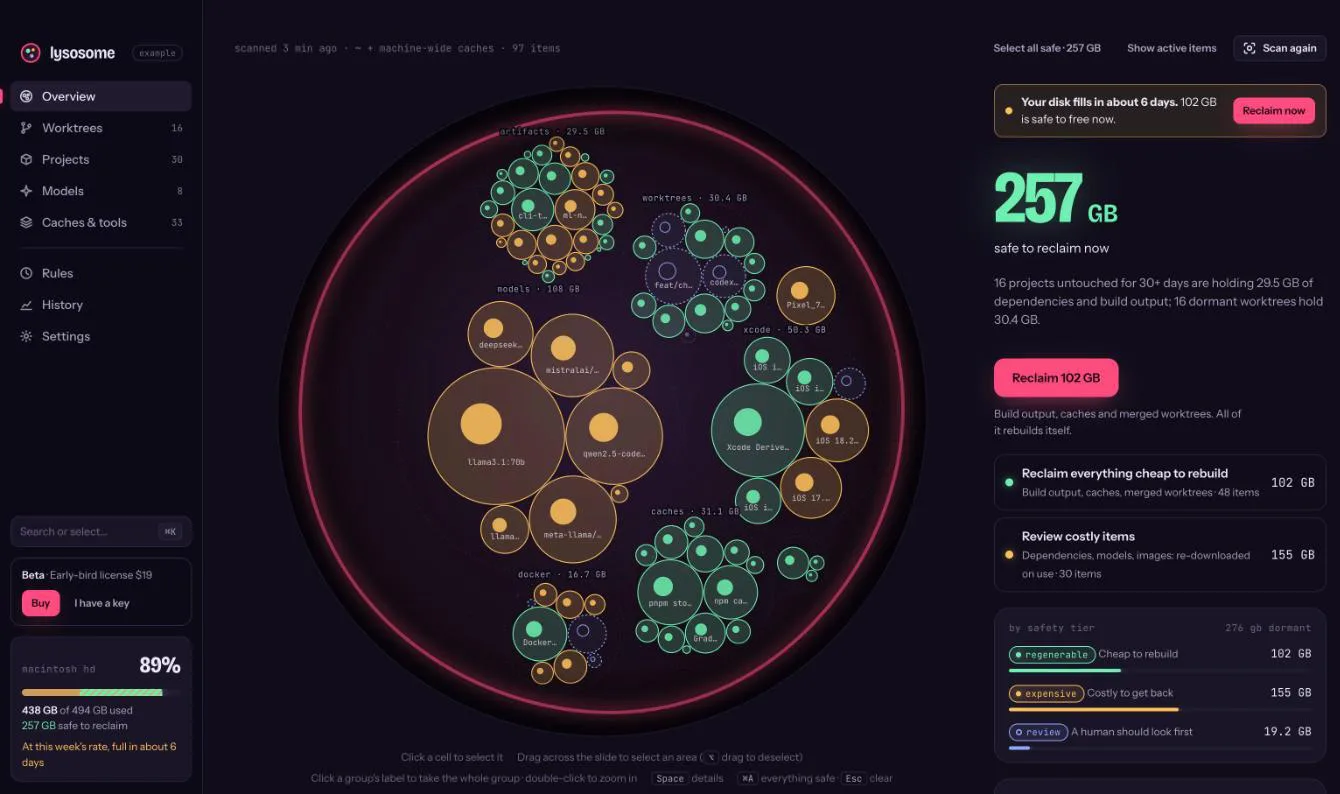
A native menu bar app built on the CLI. It keeps watch so you don't have to remember to run anything.
- Disk pressure, always on. A quiet gauge in the menu bar, and an alert before your SSD fills during a build or a model pull.
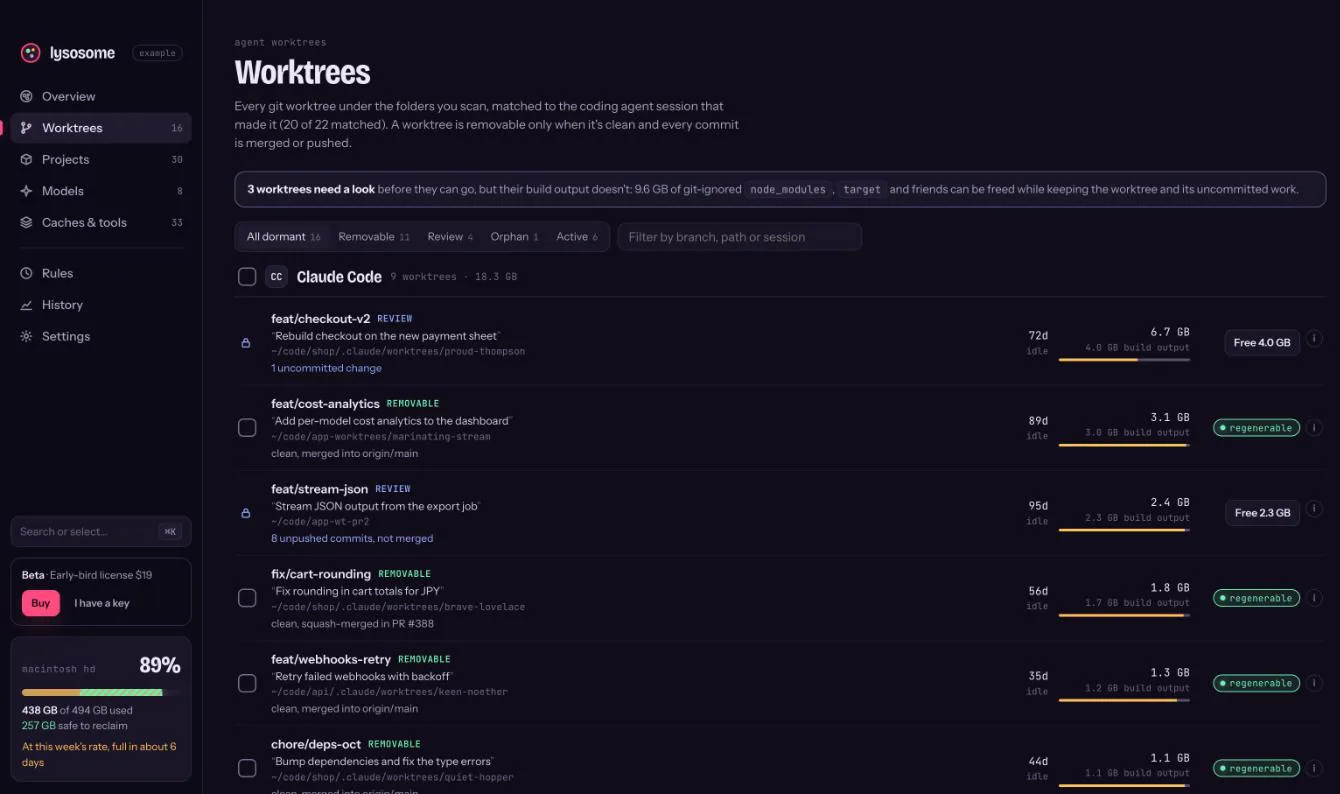
- Knows which agent made what. Worktrees are tied to the Claude Code or Cursor session that created them, so you can tell a live task from a forgotten one.
- Cleanups on a schedule. Rules like "regenerable caches older than 14 days, Sundays at 3am". Review items are never part of a rule.
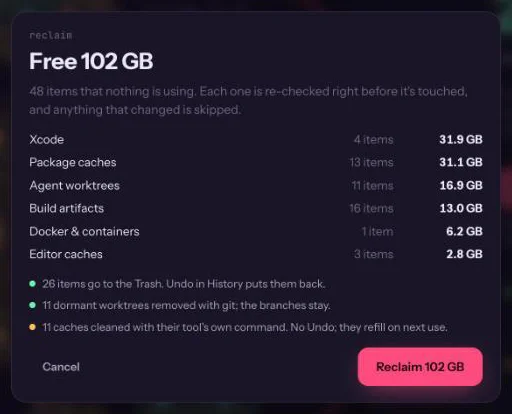
- One click, with undo. Reclaim shows exactly what goes first. Files go to the Trash and Undo puts them back; caches are cleaned by their own tool.
- History. Charts of where your space went, week by week.
- Model library. Every local model in one list, with last use, size and re-download cost.
At this week's rate, full in about 6 days
Dormant worktrees
- checkout-v2Claude Code session · idle 47d6.4 GBremovable
- refactor-authCursor agent · idle 33d3.2 GBremovable
- indexer-spike2 unpushed commits3.9 GBreview
Models
- llama3.1:70bOllama · last used 52d · ~40 GB download39.9 GBexpensive
Auto-clean: regenerable caches older than 14 days · Sun 3:00
CLI or app
The CLI is free. The app does it for you.
| Feature | CLI free · MIT | Mac app free beta · paid at 1.0 |
|---|---|---|
| Find worktrees, artifacts, caches, models, Docker, Xcode | Yes | Yes |
| Safety tier on every item | Yes | Yes |
| Dry-run cleanup to the Trash | Yes | Yes |
Stable --json for scripts | Yes | Built on it |
| Always-on disk pressure monitoring | No | Yes |
| Alerts before the disk fills | No | Yes |
| Agent-aware worktree tracking | No | Yes |
| Scheduled cleanups with rules | No | Yes |
| One-click reclaim with undo | No | Yes |
| History charts and model library | No | Yes |
| Team and fleet view | No | Later |
Pricing
Free while it's in beta.
The CLI is free and stays that way. lysosome for Mac is free during the public beta. At 1.0, seeing where your disk went (scans, the menu bar gauge, alerts) stays free, and a one-time license unlocks one-click cleanup and scheduled rules. Buy it now at the early-bird price and it's yours for good.
One-time purchase, $29 after the beta. Includes a year of updates; the key works offline, no account needed.
Questions
What is lysosome?
A disk cleaner for developers on macOS. The open-source lysosome CLI shows where your disk went (dormant git worktrees, git-ignored build artifacts, package caches, local AI models, Docker and Xcode data), labels each item by how safe it is to delete, and cleans up safely. The CLI is free and open source. lysosome for Mac, a menu bar app built on it, is in free public beta, and there are Linux builds too.
Why are agent worktrees such a problem?
Agent tools create a git worktree per task so they can work in parallel, and nothing removes them afterwards. Each worktree gets its own dependency install and build output, so a few weeks of agent work can leave dozens of copies of node_modules or target/ behind.
Can it delete something I still need?
It's built not to. Scans never modify anything. Worktrees with uncommitted changes, untracked files, locks or unpushed commits are never removed. clean is a dry run until you add --yes, and removed items go to the macOS Trash or through the tool's own cleanup command.
How do I install the CLI?
With Homebrew: brew install lysosome-dev/tap/lysosome. Or run the install script, curl -fsSL https://lysosome.dev/install.sh | sh, or build from source with cargo install --git https://github.com/lysosome-dev/cli lysosome. Prebuilt binaries for macOS and Linux are on the GitHub releases page, and lysosome completions zsh prints shell completions (bash, fish and others too).
Does it work on Linux or Windows?
macOS comes first, on Apple Silicon and Intel. The CLI also ships prebuilt Linux binaries (x86_64 and arm64, glibc and musl), and the desktop app has a .deb and an AppImage for x86_64 Linux. Windows isn't planned.
How much will the Mac app cost?
It's free during the public beta. At 1.0, scanning, alerts and Undo stay free, and one-click cleanup and scheduled rules need a one-time license: $19 early-bird during the beta, $29 after. It includes a year of updates.
What happens to my email?
It's used only to tell you when lysosome for Mac 1.0 ships, plus CLI news if you asked for it. We don't sell or share it, every email has an unsubscribe link, and the privacy page lists exactly what we store. The CLI has no telemetry.